
Cobranded Vendor Onboarding
You can customize the vendor onboarding experience in Lumanu to reflect your brand.
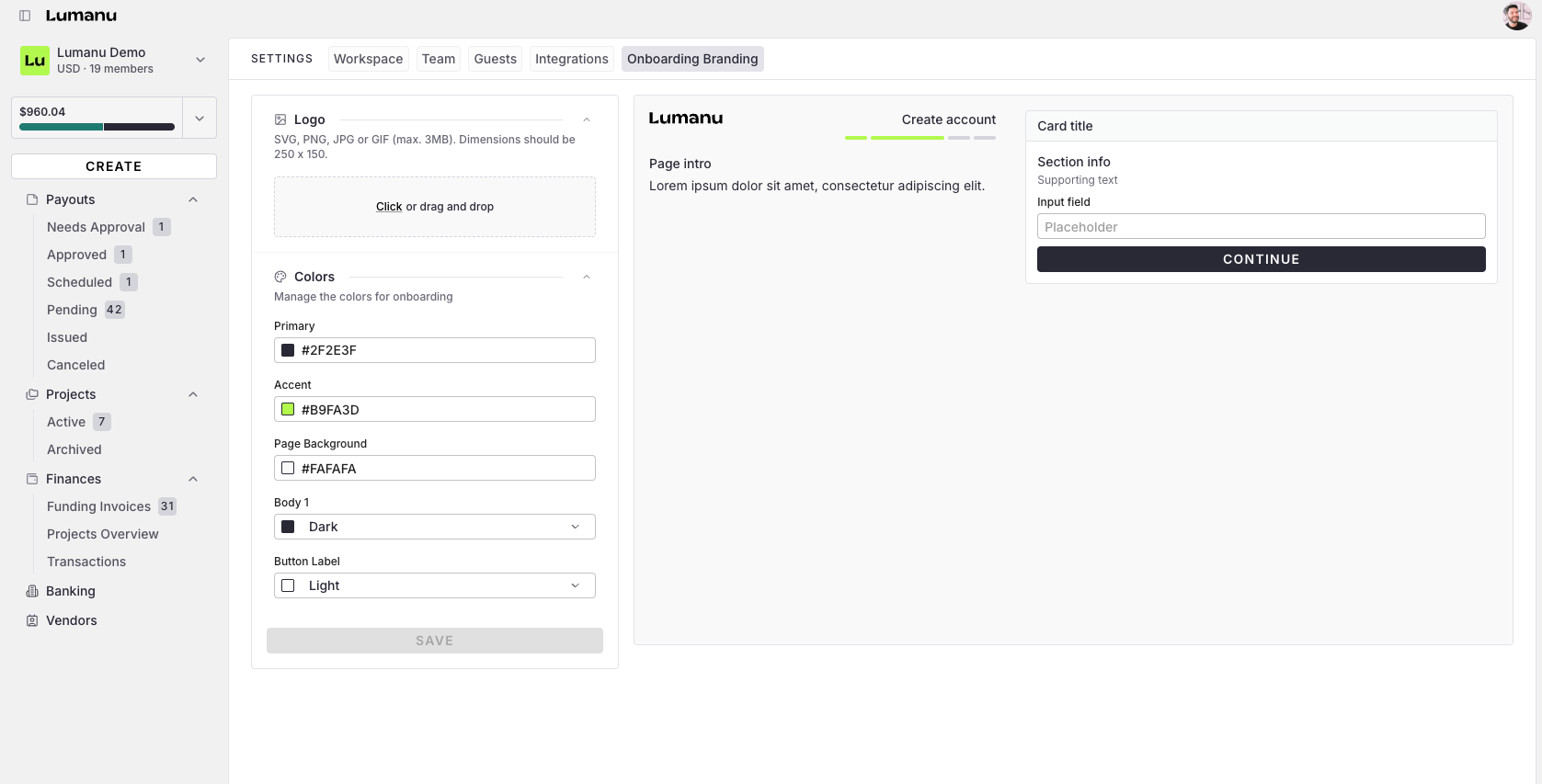
With Cobranded Onboarding, vendors invited to your workspace will see your logo and brand colors throughout the onboarding flow — creating a more seamless, professional experience from the start.
How to Access Onboarding Branding
Navigate to Settings
Select the Onboarding Branding tab
This setting is managed at the workspace level.
What You Can Customize
Within the Onboarding Branding tab, you can update:
Logo
Accepted formats: SVG, PNG, JPG, or GIF
Maximum file size: 3MB
Recommended dimensions: 250 x 150 pixels
Brand Colors
Primary Color – Used across key interface elements
Accent Color – Used for highlights and progress indicators
Page Background Color
Text & Button Styling
Configure body text (e.g., dark/light)
Configure button label contrast for accessibility
A live preview is available so you can see how vendors will experience the onboarding flow before saving changes.
What This Impacts
Your branding will appear throughout the vendor onboarding experience, including:
Account creation screens
Form pages
Buttons and progress indicators
This customization does not change:
The onboarding steps
The information collected
Compliance requirements
How vendor data is processed or secured